
How to Create a Claude.md File: A Solo Operator’s Guide to AI That Actually Remembers You
Written By: Shane Clark on May 11, 2026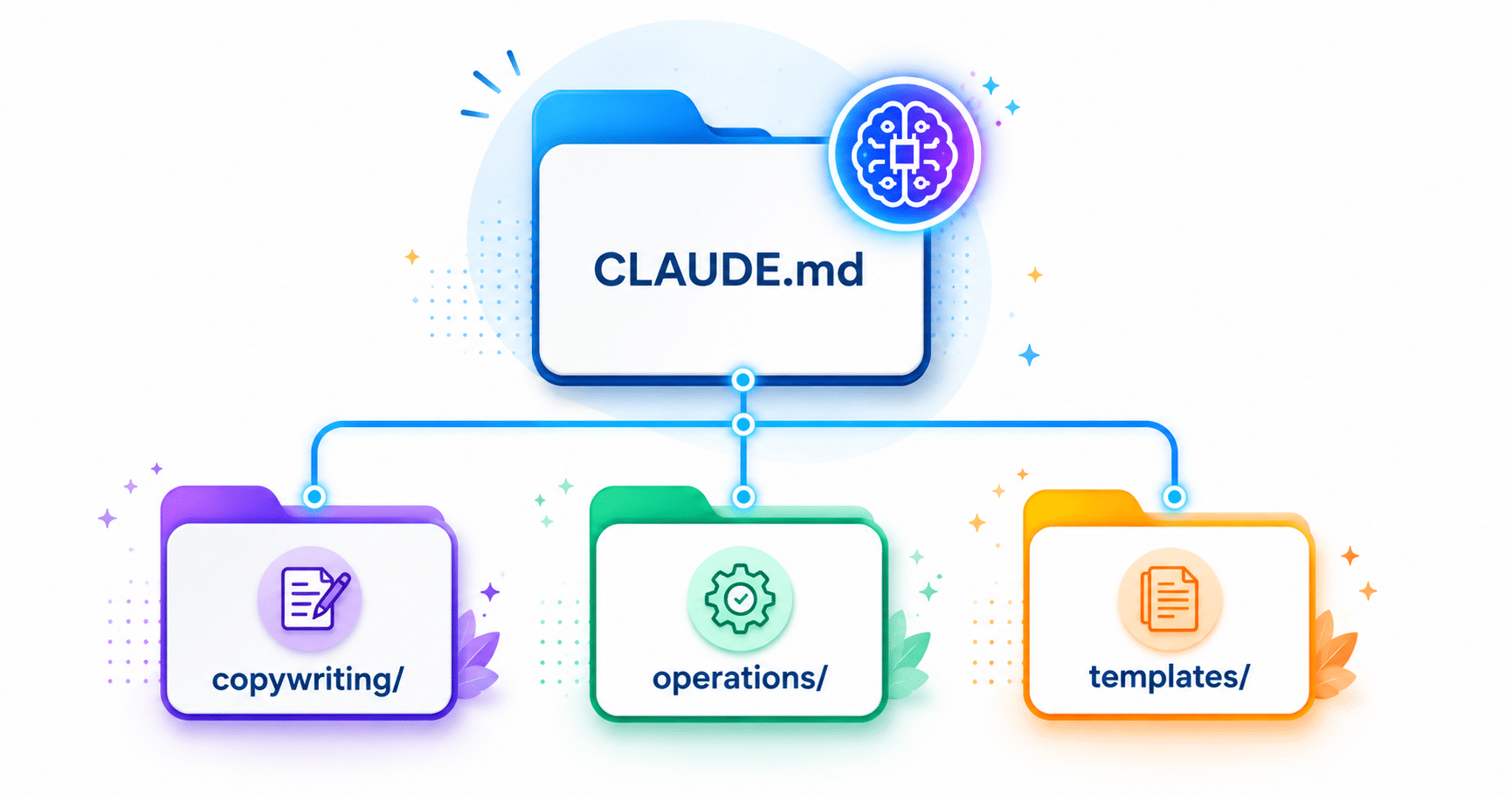
What is a Claude.md file?
A Claude.md file is a plain-text document that lives in your project folder and tells Claude who you are, how you work, and what rules to follow. Claude Code can load these project instructions according to its documented file scope. Use them to record lasting decisions, and confirm what the current session has loaded.
A Claude.md file is a Markdown instruction file supported by Claude Code. Keep it with the project and use it to point to relevant decisions and references. When working in another Claude product, provide the context through the features available in that product and session.
If you have ever opened a new AI session and watched ten minutes evaporate while you re-explained your business, your voice, your clients, and your standards before you could even start the actual work, this guide is for you. The principle scales. The same setup that lets a solo copywriter stop re-explaining herself also lets a 28-project agency run a 1,886-file knowledge tree that you can use to organize project instructions and references. Confirm how each tool receives that context as the workflow grows.
This is Part 1 of a three-part series. Part 1 covers the foundation: the root CLAUDE.md file and the folder tree it lives inside. Part 2 covers project-level setup, what a new client folder looks like inside the tree. Finally, Part 3 covers scaling across a team and every client. The whole AI Operator System cluster is mapped in the Claude Ecosystem post.
What a Claude.md file actually is
A Claude.md file is a plain-text file, written in Markdown, that sits at the root of a folder on your computer. Use the filename CLAUDE.md for Claude Code project instructions and confirm the file is loaded in the session. Its job is to brief the AI before any conversation starts: who you are, what your brand stands for, what words you do not use, what your tone sounds like, and any non-negotiable rules. Keep that brief available to the tools used for the project. In Claude Code, inspect the loaded instructions; in other products, supply the relevant context for the session.
Other tools borrow the same idea with different file names. Cursor uses .cursorrules, Windsurf uses .windsurfrules, ChatGPT calls it Custom Instructions. The principles in this guide work across all of them. CLAUDE.md is supported by Anthropic’s Claude tooling for Claude Code project instructions. Other products have their own context features; check the product and session rather than assuming identical file loading.
The brain is the tree, not the file
The single CLAUDE.md file at the root is the entry point. Once your system grows past a single page, the actual value comes from the folder tree behind it. Think of the root file as the welcome mat. Behind it is where the real knowledge lives.
Here is the simplest version of the idea. The root folder holds CLAUDE.md plus a handful of subfolders, one per domain of your work. A freelance copywriter might need just two subfolders: one for clients, one for templates. A car wash owner might need three: operations, marketing, locations. A web design agency runs nineteen: company, operations, clients, marketing, projects, web-development, security, seo, ai, prompts, templates, plus a meta folder for accumulated patterns and rules. Same principle. Different size. The tree starts small and grows when you catch yourself re-explaining something the AI should already know.
How the folder tree stores your knowledge
What lives in each subfolder is a smaller CLAUDE.md or other Markdown files that hold the rules for that domain. Inside the clients folder you will find onboarding standards, communication rules, and per-client subtrees. Operations holds pricing, tools, integrations, and troubleshooting runbooks. A templates folder stores reusable document templates. In Claude Code, root and nested instructions have documented loading scopes; other Markdown references need to be consulted or imported as appropriate. The root file is the table of contents.
This is the structural shift most guides miss. They treat “a CLAUDE.md file” as the goal. Think of the file as the start. The tree is the actual brain. Your AI session feels smart not because one file is well-written. It is that every relevant rule, voice note, standard, and client detail is accessible to the AI in one connected structure. When you stop thinking “I need to write a CLAUDE.md file” and start thinking “I am building a brain my AI tools can read,” the project scope and the payoff both change.
Why solo operators benefit more than anyone
Solo operators feel the AI memory problem more acutely than anyone else for a simple reason: they have no team to absorb context. A staffer at a large agency can ask the person at the next desk how the company writes proposals. A solo operator cannot. Every cold start is a cold start. A CLAUDE.md file and the tree behind it fill that gap. The file becomes the colleague who never forgets, and the tree becomes the institutional memory the business never had.
This same principle applies whether you are a freelance copywriter writing landing pages, a car wash owner writing customer-facing emails, or a real estate agent writing listing descriptions. The system does not care what business you run. It cares whether you have written down what you already know.
What goes in your root CLAUDE.md
The root file holds the things that apply to every session in every folder. Most root files boil down to five sections, each two to five sentences long.
- Identity. Who you are, what you do, who you serve. Two to three sentences. Includes the specifics: your name, the business name, the city you work in, your years of experience, your typical client size.
- Voice. How you sound. Plain English vs. corporate. Sentence-length preferences. Tone. Specifics about what you avoid (em-dashes, exclamation points, marketing jargon).
- Forbidden words. The specific words you never want the AI to use in your name. “Leverage.” “Synergy.” “Unlock.” “Journey.” “Robust.” Whatever you have caught yourself rewriting out of AI drafts. List them by name. The file’s job is to stop the drafts before they happen.
- Services or offerings. What you sell. The names you use for them. Prices if they are public. What you do not sell, with reasons. AI gets confused by what you do not do almost as often as by what you do.
- Non-negotiable rules. Anything that should never be overridden by a single session. Pricing minimums, payment terms, what you will not promise. These are the rules that protect the business from a session going off script.
Five sections. Roughly 300 to 600 words total for a starter file. Comprehensive examples for five different industries are in the section below.
Sample prompts to get started
📂 Freelance copywriter (Maria, B2B SaaS landing pages)
# Identity

I am Maria, a freelance copywriter who writes B2B SaaS landing pages, email sequences, and case studies. I work with companies between 20 and 200 employees, mostly in fintech, devtools, and B2B SaaS adjacent. I have ten years of experience and bill at $200 to $350 per hour.

# Voice

Plain English. Direct. Short sentences. No filler. I never use the words leverage, synergy, unlock, journey, robust, or ecosystem unless the context is technical and unavoidable. I avoid em-dashes; I use commas, periods, or colons instead. I do not use exclamation points in business writing.

# What I sell

- Landing page copy (3,000 to 5,000 words, two-week turnaround, $3,500 base)
- Email sequences (5 to 12 emails, one-week turnaround, $2,000 to $4,500)
- Case studies (1,500 to 2,500 words, three-week turnaround, $2,500)
- Strategic positioning intensives (one week with the founder, $7,500)

# What I do not sell

- Blog posts (low margin, churn-heavy clients)
- Social media content (not my craft)
- Press releases (the format is dead and I will not write them well)

# Non-negotiable rules

- Never write copy that uses fake urgency ("only 3 spots left," "ends tonight")
- Never include AI-generated stock photos in deliverables
- All invoices in USD, net 14, late fee 1.5%/month after 30 days
- I do not draft cold outreach for products I have not used myself
📂 Car wash owner (Marcus, three-location express wash chain)
# Identity

I am Marcus, owner of Clearwater Express Wash, a three-location tunnel car wash chain in the Phoenix metro area. I serve everyday drivers, fleet operators, and monthly membership customers. I have owned and operated car washes for eleven years.

# Voice

Friendly, direct, and local. Short sentences. Conversational. I never use the words premium, luxury, cutting-edge, or world-class. My customers want clean cars fast at a fair price. Write like that is what I deliver, because it is.

# What I sell

- Single wash (Basic $8, Better $14, Best $20, Works $26)
- Unlimited monthly memberships ($29, $39, $49 per month)
- Fleet accounts (custom pricing, net 30 billing)
- Gift cards (available at all three locations and online)

# What I do not sell

- Detailing (no labor capacity, refer to partner shops)
- Interior vacuuming (self-serve vacuums only, no attended service)

# Operations

- Locations: Scottsdale, Tempe, Gilbert
- Hours: 7am to 9pm daily
- Membership pause available once per year, up to 60 days
- No refunds on memberships after 3 days of activation

# Non-negotiable rules

- Never promise a specific wash time in marketing materials
- Always mention the free vacuum with every membership in customer communications
- Fleet pricing is confidential and never published publicly
📂 Real estate agent (Diane, residential buyer and seller in Austin TX)
# Identity

I am Diane, a licensed real estate agent in Austin, Texas. I represent buyers and sellers of residential properties, primarily single-family homes and condos in the $400K to $1.2M range. I have been licensed for nine years and work independently under Keller Williams Realty.

# Voice

Warm, knowledgeable, and direct. I avoid real estate clichés: no "nestled," no "charming," no "cozy" (unless it means small and I am disclosing that). I write listing descriptions that describe what the home actually looks like and what the neighborhood actually offers. I do not use exclamation points.

# What I do

- Buyer representation (full service from search through close)
- Seller representation (pricing strategy, prep, listing, negotiation, close)
- Relocation consulting (in-bound Austin moves, corporate and personal)

# What I do not do

- Property management
- Commercial leasing
- Investment underwriting (I refer to a specialist)

# Non-negotiable rules

- All disclosed defects must appear in writing before any offer is drafted
- Never describe a feature as "updated" unless I have confirmed the year and scope
- I do not ghost clients. Response time is same business day or I explain why
- Referral fee agreements must be in writing before I send a referral
📂 SaaS founder (James, B2B project management tool for construction)
# Identity

I am James, founder and CEO of Buildr, a B2B SaaS project management platform built for residential construction companies. Our customers are home builders and general contractors running 5 to 50 concurrent projects. We are a 12-person team, bootstrapped, and at $1.4M ARR.

# Voice

Founder-direct. No corporate language. No buzzwords. I write like I am talking to a fellow operator who has no patience for fluff. I never use the words revolutionize, disrupt, game-changer, seamless, or frictionless. If something is hard, I say it is hard.

# What we sell

- Buildr Core: $149/month per company (up to 10 active projects)
- Buildr Pro: $349/month per company (unlimited projects, API access)
- Buildr Enterprise: custom pricing (white-label, SSO, dedicated support)
- Annual plans: 2 months free

# What we do not sell

- One-time licenses (SaaS only, no perpetual)
- Services or implementation (self-serve product, no consulting arm)

# Non-negotiable rules

- We do not compete on price with ProCore. Do not position us as "cheaper ProCore."
- Our positioning is "built for residential, not adapted from commercial"
- Never promise a feature in a sales email without checking the roadmap first
- Customer data is never used for training without explicit written consent
📂 Web design agency (ShaneWebGuy, local service business websites)
# Identity

I am Shane Clark, owner of ShaneWebGuy, a web design and local SEO agency based in San Jose, California. I build websites and run SEO campaigns for local service businesses: contractors, medical practices, law firms, home services companies, and professional services. I have been doing this for over a decade and currently run 28 active client accounts.

# Voice

Practical, plain, and direct. I never use the words leverage, synergy, unlock, or cutting-edge. I write like a contractor who shows up on time and explains what he is doing. No hype. No promises I cannot keep.

# What I sell

- New website builds (WordPress, custom design, $3,500 to $12,000)
- Monthly SEO retainers ($750 to $2,500/month depending on market competition)
- Google Ads management ($500/month management fee, minimum $1,000 ad spend)
- Website maintenance plans ($150 to $300/month)

# What I do not sell

- Social media management (not my expertise, I refer out)
- E-commerce development (refer to specialist)
- Logos or branding (I work with a brand partner)

# Non-negotiable rules

- I own all code and assets until the project invoice is paid in full
- No project starts without a signed contract and 50% deposit
- I do not guarantee rankings. I guarantee the work.
- Monthly retainer clients get a written report every month, no exceptions
How to iterate on the file
The single most useful habit, once you have a working CLAUDE.md, is editing it the moment you catch yourself re-explaining something. Every re-explanation is a signal the file is missing a rule. The discipline is small: when a session goes off the rails because the AI used a forbidden word, do not just correct that one response. Open the file, add the rule, save. The next session will have it.
Over months, the file gets longer. Most working CLAUDE.md files end up at 1,500 to 5,000 words. A few grow past 50,000 words for businesses with deep operational complexity. Length is not a quality signal. Specificity is. A 500-word file with the right ten rules beats a 5,000-word file with vague aspirational platitudes. The same disciplined catch-and-codify cycle is what every durable AI system is built on.
Frequently asked questions
How is this different from a ChatGPT Custom Instruction?
CLAUDE.md stores project instructions in a Markdown file you can review and version with the project. Loaded content uses Claude Code's context, so keep the file concise and consult task-specific references when needed. Other products' instruction features have their own scope and limits.
What is the right length for a CLAUDE.md file?
Long enough to cover the rules that matter, short enough to be maintainable. Most starter files land between 300 and 600 words. Most mature files land between 1,500 and 5,000 words. The right question is not "how long should this be?" but "what do I keep having to re-explain?" Every answer to that question is a paragraph that belongs in the file.
Do I need one CLAUDE.md or many?
One at the root to start. Over time, one per subfolder that has its own set of rules. The root file is for universal rules. The subfolder files are for domain-specific rules. A client folder might have its own CLAUDE.md that holds just that client's voice, their approved keywords, and their contract terms. The root file never needs to know those details. The subfolder file does.
What if the AI ignores the file?
Check that the file is actually at the root of the folder the tool has open. The most common failure mode is that the file exists but the tool is not pointed at the right folder. The second most common failure mode is that the file exists and is loaded, but the rule is vague. "Write in a professional tone" is not a rule. "Never use em-dashes, never use exclamation points, keep sentences under 25 words" is a rule. The more specific the file, the harder it is for the AI to ignore it.
Part 2 of this series covers project-level CLAUDE.md files and what a new client folder looks like inside the tree. Read Part 2 here.
Explore the AI Operator System
📂 Start here: the hub
- The Claude Ecosystem
Four tools, one brain, one workflow.
📂 The 12 Pillars: the inspection framework
- The 12 Pillars of an Effective AI Operator
Cornerstone: what to check in everything AI produces. - The AI Experience Layer
UI, UX, Accessibility, Content. - The AI Truth Layer
Data Integrity, Relational Database, Logic. - The AI Runtime Layer
Performance, User Engagement. - The AI Growth Layer
Scalability. - The AI Human Layer
Communication, Situational Awareness.
📂 Building your MD brain: the how-to guides
- How to Create a Claude.md File
Freelancer foundation, the entry-point file. - Claude.md for Projects
Project-level setup for client work. - Claude.md for Agencies
Scaling across a team and every client.
📂 The AI operator’s toolkit: related reading
- From Outsourcing to AI-Assisted Insourcing
Why six specialists collapse into one operator. - End of Task Work, AI Replacing Jobs
What gets automated and what keeps its value. - Spotting Real-World AI Opportunities
How to see where AI can pay off in your business. - Two Types of AI You Need to Build
Agents vs. assistants, what each is for. - Improving Cycles with AI Automation
The catch-and-fix loop that scales human attention. - Building AI Agents for Business
When software starts to act on its own. - AI Agents for Business Workflows
Where agents fit inside real day-to-day work.
