
Why AI Project Planning Matters More Than the Code You Write
Written By: Shane Clark on March 20, 2026
What is AI project planning?
AI project planning is the work you do before any code gets written: defining the system, mapping the workflow, and setting the rules and edge cases. I plan first because the tool is rarely the problem. A clear plan is what turns a vague prompt into something an AI can actually build well.
Don’t let any cowboy with a $20 Claude Pro account talk you into building something you haven’t planned.
AI is powerful, but the tool isn’t the problem. Instead, people run into issues because of how they use it. Most jump in, start prompting, and hope something useful comes out. Sometimes it works. More often, it doesn’t.
Good process drives everything.
Without a clear definition of what you’re building, how it works, and what rules it follows, AI starts guessing. That leads to inconsistent results, wasted time, and projects that fall apart before they even get going.
Most AI projects fail at the beginning. They don’t break during development, and the model isn’t usually the issue. The real problem shows up before anyone writes a single line of code.
This guide focuses on AI project planning and the system I use to structure every project before I build anything. By doing this first, you remove guesswork and give AI clear direction from the start.
Take the time to plan upfront. Everything that follows becomes faster, cleaner, and more predictable. Skip it, and you’re rolling the dice.
Why AI Project Planning Matters More Than the Code Itself
Most people think the hard part of building an AI project is the code. It’s not. The hard part is knowing exactly what you’re trying to build before you start.
Code is execution. Planning is direction.
If your direction is unclear, the code won’t save you. You’ll end up rewriting features, changing logic, and constantly fixing things that never should have been built that way in the first place.
This is especially true with AI.
AI doesn’t think like a developer. It responds to context. If the context is weak, the output is weak. If the structure is unclear, the results become inconsistent.
That’s why AI project planning matters more than the code itself. When you define the system upfront, the code becomes the easy part.
Most AI Projects Fail Before Development Even Starts
Most failures don’t happen during development. They happen before anything is built.
People skip the planning phase. They jump straight into prompting or coding without defining the system. At first, it feels productive. You see output. You see movement. However, that momentum doesn’t last.
Eventually, things break.
The workflow doesn’t make sense. The outputs don’t match the intent. Features start overlapping. Edge cases get ignored. Then everything becomes harder to manage.
At that point, you’re not building anymore. You’re patching.
A lot of people blame the AI when this happens. In reality, the issue started earlier. Without proper AI project planning, the system never had a clear foundation.
Good Process Beats Better Code Every Time
You can have great code and still end up with a bad system.
If the process is wrong, the code will follow it.
A good process defines what gets built, how it behaves, how it handles edge cases, and how users interact with it.
Once that process is clear, the code becomes a tool, not a guessing game.
This is where most developers go wrong with AI. They focus on prompts or models instead of process. They try to improve outputs without improving the system behind those outputs.
Better prompts don’t fix a broken process.
A clear process does.
The AI Project Planning Framework You Should Follow
Before you build anything, you need a framework. Not a rough idea. Not a few notes. A structured system that defines how everything works.
This is the framework
- system definition
- workflow
- features
- rules
- edge cases
- prompts
- ui
- data
- technical logic
Each part plays a role. Together, they create a complete picture of the project.
Once this exists, AI stops guessing. It starts following instructions.
That’s the shift.
Instead of asking AI to figure things out, you give it a system to execute.
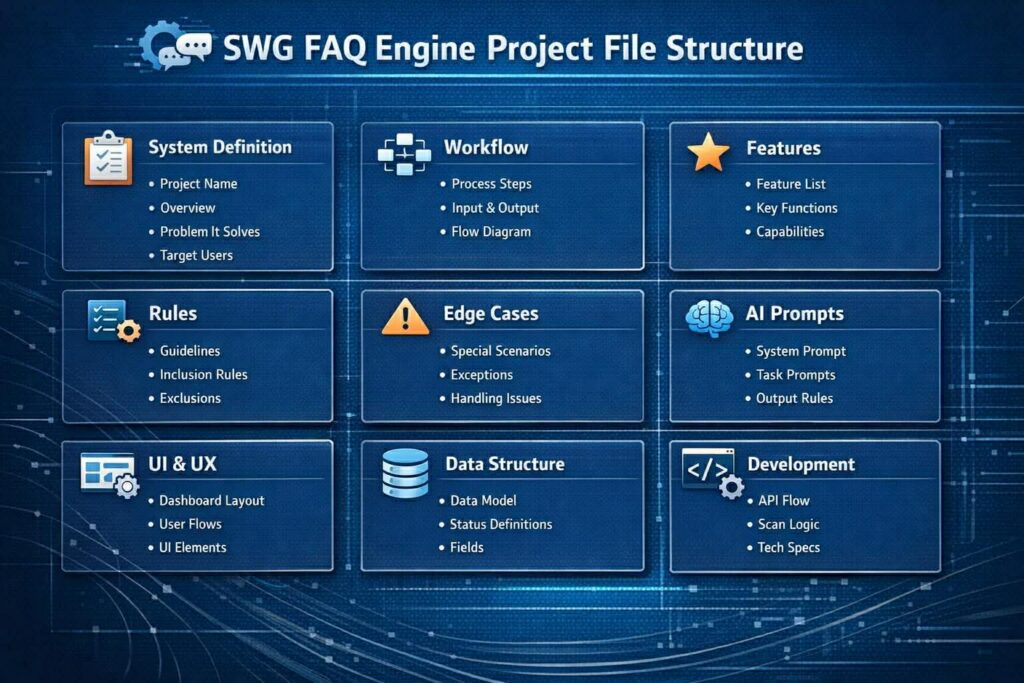
Define the System Before You Write a Single Line of Code
Before anything else, you need to define the system.
What are you actually building? Who is it for? What problem does it solve?
If you can’t answer those questions clearly, you’re not ready to build yet.
This is where most people skip ahead. They assume they’ll figure it out as they go. That works for small projects, but it breaks fast with AI systems.
AI needs clarity upfront. It needs to understand the purpose of the system before it can help execute it.
When you define the system first, everything else starts to line up. Features make more sense. Workflows become clearer. Decisions get easier.
Without that definition, you’re just reacting instead of building.
Map the Workflow So AI Doesn’t Have to Guess
Once the system is defined, the next step is the workflow.
How does this thing actually work from start to finish?
Think in terms of flow
input → process → output
What triggers the system? What happens next? Where does AI step in? What does the user see?
If you don’t map this out, AI fills in the gaps on its own. That’s where things start to drift.
A clear workflow removes that ambiguity.
It shows exactly how the system should behave at every step. It also makes it easier to spot problems early, before you write any code.
When the workflow is solid, AI stops guessing and starts following.
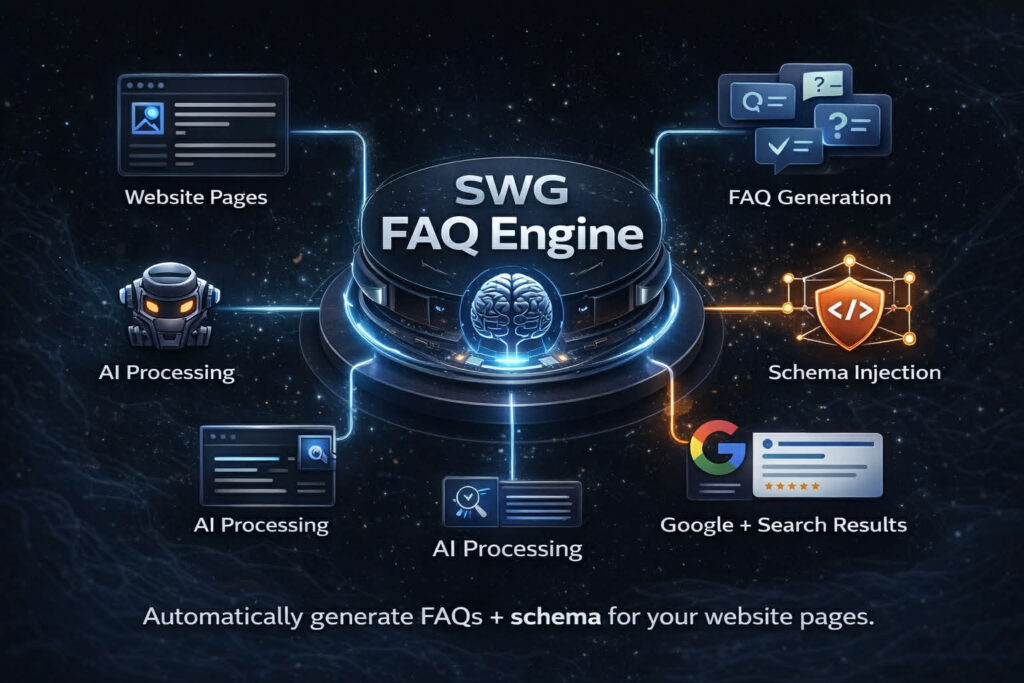
Set Features, Rules, and Edge Cases Early
Now you define what the system can do and how it should behave.
Features are the capabilities. Rules are the guardrails. Edge cases are the reality check.
Most people focus only on features. They think about what they want the system to do, but not how it should behave when things don’t go as planned.
That’s where issues show up later.
Rules keep the system consistent. They prevent bad outputs and unexpected behavior.
Edge cases prepare the system for real-world use. They force you to think about what happens when inputs are messy, incomplete, or unusual.
When you define all three early, you avoid constant fixes later.
Train the AI Before You Ask It to Build Anything
At this point, you understand the system. Now you need to teach it to the AI.
This is where prompts come in.
Your system prompt defines how the AI behaves. Task prompts control what the AI does. The output rules then shape how the final results appear.
Without this layer, AI goes back to guessing.
With it, AI starts to act like part of your system.
You’re not just asking for output anymore. You’re giving instructions within a defined structure.
That’s the difference between random results and reliable ones.
How AI Project Planning Comes Together Before You Build
At this point, everything connects into a single system.
Instead of working with separate ideas, you now have a structured plan that moves from definition to execution. The system definition sets direction, while the workflow shows how everything operates. From there, features, rules, and edge cases define behavior across the project.
As a result, each part supports the next.
When this structure is in place, AI follows a clear path instead of filling in gaps. That shift removes confusion and reduces rework later in the process.
In contrast, skipping this step leads to inconsistent outputs and constant fixes.
Because of that, strong AI project planning creates a predictable build. Rather than reacting to problems, you move forward with a defined system.
Why AI Project Planning Works Across Any AI Tool or Platform
It does not matter which AI tool you are using.
Whether you are working in Cursor, Claude, ChatGPT, or other development environments, the core process stays the same. The interface may change, and the features may vary, but the foundation does not.
You still need a defined system. You still need a clear workflow. You still need structured prompts and organized documentation.
Because of that, the success of your project is not tied to the tool. It is tied to the process behind it.
When your project is well planned, you can move between tools without starting over. You can test different models, compare outputs, and adapt as technology changes.
On the other hand, if your process is weak, switching tools will not fix the problem.
For that reason, strong AI project planning gives you long-term flexibility. It allows you to build once and evolve over time, instead of rebuilding with every new platform.
The Entry Prompt That Drives AI Project Planning From Start to Build
Once the structure exists, the entry prompt puts it into motion.
Instead of jumping into code, you guide the AI to read your project first. It reviews the README, follows the linked files, and builds context before taking action.
This step matters because it prevents guesswork.
By starting this way, the AI uses your documentation as its source of truth. Every decision it makes connects back to the system you already defined.
Without this step, results vary from one output to the next. However, with a clear entry prompt, the process becomes consistent.
In other words, you are not asking the AI to figure things out. You are directing it to follow a plan.
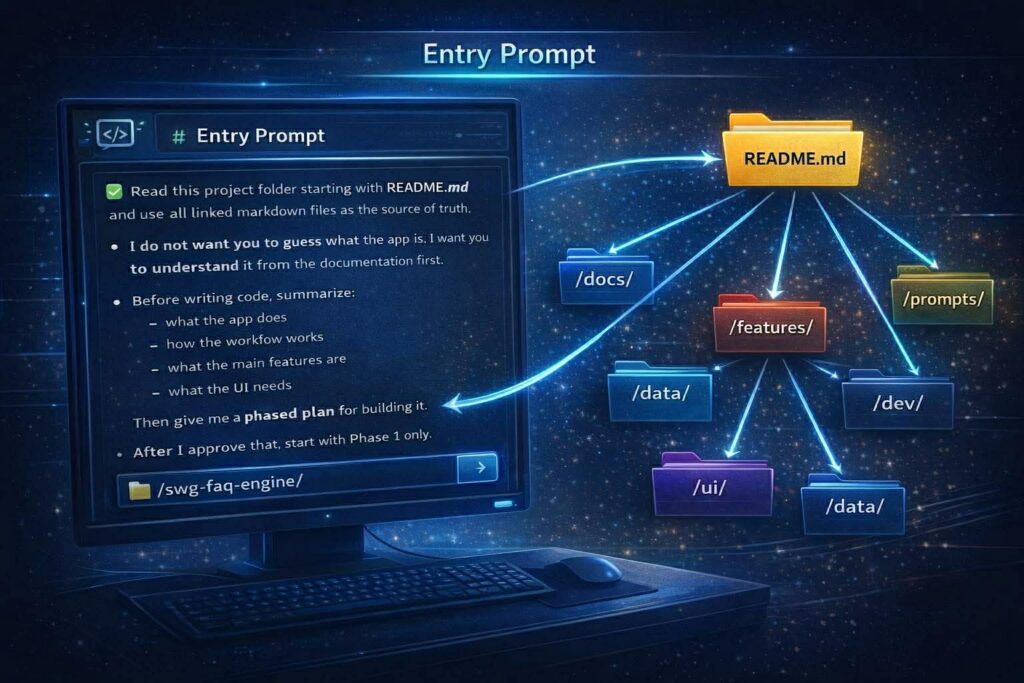
Why README.md Holds Your Entire AI Project Planning Structure Together
At the center of the project sits the README.md file.
It introduces the system, explains the workflow, and points to every major component. Because of that, it acts as the main entry point for both you and the AI.
Without a strong README, information becomes scattered. As a result, it becomes harder to maintain consistency across the project.
On the other hand, a well-structured README creates clarity.
It gives the AI immediate context and shows exactly where to go next. In addition, it connects all supporting files into a single, organized system.
For that reason, this file does more than describe the project. It holds the entire structure together.

The AI Project File Structure You Should Build Before Development Starts
Before writing any code, you should already have a complete project structure in place.
Each part exists as a markdown file, and together they define the full system the AI will follow. Because of this, your documentation becomes the foundation of the build, not something added later.
When everything is organized this way, the entry prompt can point to a single source of truth. From there, the AI can move through the project without guessing.
As a result, the build process becomes more controlled and easier to manage.
System definition
- Project name
- Overview
- Problem it solves
- Target users
Workflow
- Process steps
- Input and output
- Flow diagram
Features
- Feature list
- Key functions
- Capabilities
Rules
- Guidelines
- Inclusion rules
- Exclusions
Edge cases
- Special scenarios
- Exceptions
- Handling issues
System prompt
- AI behavior definition
- Global instructions
Task prompts
- Specific actions for AI
- Feature-level prompts
Output rules
- Formatting rules
- Structure requirements
Dashboard layout
- Page structure
- Navigation
User flows
- Step-by-step interactions
- User journey
UI components
- Buttons
- Forms
- Elements
Data structure
- Data model
- Fields
- Relationships
Status definitions
- States
- Labels
- Transitions
API flow
- Requests
- Responses
- Integrations
Scan logic
- Detection rules
- Processing logic
Assets
- Graphics
- Mockups
- Visual references
README
- Entry point
- File mapping
- System summary
Why AI Project Planning Works With Any AI Tool
This approach is not tied to a single tool.
Whether you use Claude, ChatGPT, Cursor, or something else, the same principle applies. AI performs better when it has structure, context, and clear instructions.
The model does not matter as much as the system you give it.
If your project is well-defined, any capable AI tool can follow it. If your project lacks structure, even the best model will struggle to produce consistent results.
Because of that, strong AI project planning gives you flexibility.
You are no longer dependent on one platform. You can switch tools, test different models, or adapt over time without rebuilding your entire workflow.
That is what makes this approach long-term and scalable.
Common Mistakes in AI Project Planning (And How to Avoid Them)
Most people make the same mistakes when starting an AI project.
First, they skip the system definition. As a result, the project lacks direction from the beginning.
Next, they jump straight into prompting. While that feels productive, it usually leads to inconsistent outputs and rework.
Another common issue is ignoring workflow. Without a clear process, the system becomes difficult to manage as it grows.
In addition, many projects do not define rules or edge cases. That creates problems when inputs are messy or unexpected.
Finally, some people treat documentation as optional. In reality, documentation is the foundation of the entire build.
To avoid these mistakes, slow down at the start.
Define the system. Map the workflow. Set rules. Document everything.
Then move into the build.
What to Do Next After You Finish Your AI Project Planning
Once your planning is complete, the next step is execution.
Start by creating your project folder and organizing your markdown files. Make sure your README connects everything clearly.
Then write your entry prompt.
This prompt should direct the AI to read your project, understand the system, and propose a plan before building anything.
From there, begin in phases.
Start with the foundation. Build the core logic. Add features step by step. Refine as you go.
Because your planning is already complete, you are not guessing during this phase. You are following a system.
That makes the build faster and more predictable.
Work With ShaneWebGuy for AI Project Planning and Development
If you want to build AI systems the right way, process matters.
This approach comes from nearly 20 years of experience across IT, web development, and digital marketing. It is not theory. It is based on real projects, real workflows, and real results.
At ShaneWebGuy, the focus is on building structured systems that actually work. That includes AI business automation, web development, and SEO, all built on a clear process from the start.
If you are serious about AI project planning and want to avoid costly mistakes, it helps to work with someone who understands both the technical side and the business side.
Build it right the first time.
Want help with the kind of web platforms or SEO programs covered here? I’m Shane Clark, the operator at ShaneWebGuy. 21 years building US web platforms and running internet marketing systems. If you want a second pair of eyes on what’s breaking, send me a note or call (408) 915-5077. US clients only.
AI Project Planning Frequently Asked Questions
How do you plan an AI project before development
Start by defining the system, outlining the workflow, and documenting features. Then create structured prompts and organize everything into a clear folder system before writing any code.
What happens if you skip AI project planning
Without planning, the AI will guess instead of follow instructions. This leads to inconsistent outputs, rework, and wasted time during development.
Does AI project planning work across different tools
Yes, AI project planning works across tools like Claude, ChatGPT, and Cursor. While interfaces differ, the underlying process remains the same.
What should be included in an AI project structure
A strong structure includes system definition, workflows, features, prompts, UI plans, data structure, and development logic. These are usually stored in markdown files.
What is a system prompt in AI development
A system prompt defines how the AI behaves. It sets the tone, rules, and boundaries for how the AI responds throughout the project.
What are task prompts and how are they used
Task prompts tell the AI what to do in specific situations. They guide actions like generating content, analyzing data, or building features.
What are output rules in AI project planning
Output rules define how results should be formatted. This ensures consistency in structure, tone, and usability across all outputs.
Why use markdown files in AI project planning
Markdown files create a structured, readable format for AI to follow. They act as a single source of truth for the entire project.
How does AI project planning improve scalability
With a strong plan, you can reuse systems, switch tools, and scale projects without rebuilding from scratch. This saves time and increases efficiency.
