
Correctly Utilizing a Project Management System
Written By: Shane Clark on October 13, 2017
There are many project management systems available out there. Each of them has certain features that appeal to its user base. Regardless of what system you implement, there are some inherent fundamentals and protocols that make the experience much more efficient. I will cover items I feel are universal to every system. The three project management systems I have used most frequently are Asana, Basecamp, and TeamWork. The system I currently subscribe to is Basecamp. I like its simplicity for handling small to medium size projects.
The Title of the Task / To-Do Should Not Contain the instructions

Regardless of the project management system you use, an administrator must assign tasks to designated people. These assignments demand executive administrative assistant skills. The task name itself should only be a clue about the task contents. You should not try to place the instructions in the title. The image is an example from Basecamp of a simple but well formed list. “Site Fixes” has two to-dos underneath it. If you look closely, you will see the number of comments on each individual to do. The title of the to do should just be a clear enough indicator on what instructions reside inside the to-do. Use this as a reference; it is especially useful as your list grows longer.
Assignment of the Task / To-Do
The key purpose of your project management system is to be able to accurately track who is doing what. A task / to-do should first be assigned. Once the “assignee” completes the task / to-do as per the instructions, he / she should reply. The reply should contain the update and the current assignee should reassign the task back to the originator. The original requester should be the only one who is able to close or complete the task. Each time someone reassigns a task, the assigned person should take some tangible action. These can include “check”, “clarify”, “provide more information” and “reassign” to name a few. For the system to work, it is important to be continually monitoring your tasks to make sure they are are moving in the right direction.
Placement of Static Information
It is important to understand what information must be easily accessible throughout the life of the project. Things like project scopes, meeting notes and logins very easily disappear inside a task. You should add these to a notebook or text document. Both Basecamp and TeamWork support notebooks for static content placement. Asana while probably the most robust and powerful of the three systems, is lacking in the area of static content management. Deciding what information will be needed in the future is a judgement call that comes with learning the system over time.
Referencing the File in a URL
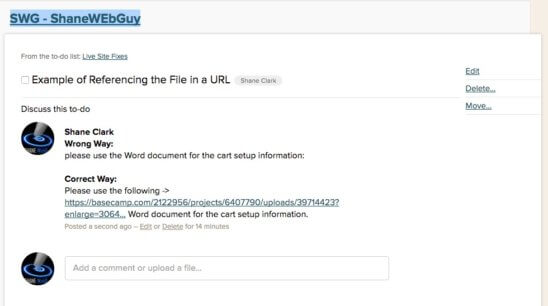
Any time you need a document or image as part of a task / to-do and / or static document it should be referred as a URL inside the request. I can no longer count the number of times I have seen a request such as “please use the file” and have found myself having to go on a hunting mission to figure out which one the client meant. In almost every project management system including Asana, Basecamp and TeamWork, it is very easy to grab the URL out of the top of the browser to be able to reference it inline as part of the instructions. The person reviewing the instructions is “one click” away from having the actual file(s) they need to complete the task.
I utilize both Dropbox and Google drive along with the project management system to be able to achieve the same goal. Instead of saying “please use the logo for my Facebook page”, I would say please use this -> https://www.dropbox.com/s/onplyxkhnt0nddy/ logo for my Facebook page. This avoids any confusion.
What Should Be Inside a Task / To-Do
A well formed task or to-do is key to the success of the project. You require three major elements for a web page change: required digital assets and supporting screenshots, the page URL, and the instructions.
1. Page URL – Listing out the page URL is a big time saver. The bigger the web site, the more time it takes to find the page that is only listed by name. I normally even list out the home page for the sake of absolute clarification.
2. Body of the Instructions – These should be clear and concise instructions with no extra commentary. Thoughts and ideas that are mixed inside a to-do can be a big cause of misspent effort / hours. More words in most cases does not equate to better instructions. Random thoughts should not be placed within the instructions.
3 – Required Digital Assets – Any assets such as images, digital documents, and other files needed to complete the task or to-do should be included within the task thread. This can be either done as an attachment or link to the digital asset itself.
4 – Supporting Screenshots – I could never emphasize the power of screenshots to save both the developer and the client time and aggravation. I find that clients that are not willing to send screenshots claiming that they do not have enough time, end up spending more time on the phone or going back and forth trying to explain in text within task thread. Incorporating screenshots as part of well formed instructions is ideal.
Things That Never Belong Inside a Task / To-Do
1. Copy / Paste Instructions That Have Not Been Reviewed – A to-do / task should be a well formed thought of exactly what needs to happen by the person adding it. It is equally important for the person responsible to review and execute the task in a “professional manner” as the one adding it. The developer saying, “well, I did not really look” would not go over very well. I feel the same way when I see agency clients that do not take the time to review what they send from their clients.
2. Extra Commentary – The task should contain only what is needed to complete that task. Information outside the specific task needed will just add confusion. It is important to remember there are no extra points for additional words.
3. Cost / Prices – Project / task quotes should never be listed inside a to-do / task. There are exceptions to this rule, but as additional people are added to the project it could cause problems. An alternative to quoting a cost such as a dollar amount, is to provide hours on the quote.
